How to Use Samsung Induction Cooktop
Learning how to use Samsung induction cooktop technology is the best way to speed up your meal prep and increase kitchen safety. By using magnetic cookware and intuitive touch controls, you can achieve precise heat levels and effortless cleanup.
So, you just got a new Samsung induction cooktop, or maybe you are moving into a place that has one. First of all, congratulations! You are about to experience one of the fastest and most efficient ways to cook. If you are used to gas flames or glowing red electric coils, induction might feel like magic. Instead of heating the air or the glass, it uses magnetic energy to heat your pan directly. This means less wasted heat and much faster boiling times.
But if you have never used one before, the touch controls and the requirement for specific pans can be a bit confusing. You might be wondering, “Why isn’t my pot heating up?” or “How do I use the boost mode without burning my dinner?” Don’t worry. Learning how to use Samsung induction cooktop features is actually very simple once you understand the basics.
In this guide, we will walk you through everything. From the first time you press the power button to the best way to clean the glass, we have you covered. Let’s get your kitchen running like a pro so you can spend less time waiting for water to boil and more time enjoying your meals.
Key Takeaways
- Magnetic Cookware is Required: Induction only works with cast iron or magnetic stainless steel pans.
- Rapid Heating: Samsung induction cooktops heat up much faster than traditional electric or gas stoves.
- Safety First: The glass surface stays cooler than the pan, reducing the risk of severe burns.
- Precise Control: Use the touch sliders or buttons to adjust heat levels instantly.
- Easy Cleaning: The flat glass surface allows for quick wipes without scrubbing burnt-on food.
- Power Management: Features like “Power Boost” allow for boiling water in a fraction of the usual time.
📑 Table of Contents
Getting Started: The Basics of Induction
Before you turn on the heat, it is important to understand how this technology works. Unlike traditional stoves, induction does not create heat on the surface. Instead, it creates a magnetic field. When you place a magnetic pan on the burner, the field excites the molecules in the metal, creating heat inside the pan itself. This is why the cooktop surface stays relatively cool, even while your food is sizzling.
Checking Your Cookware
The most common mistake people make when learning how to use Samsung induction cooktop models is using the wrong pans. If your pan isn’t magnetic, the cooktop simply won’t turn on. You might see an error code or a flashing light on the display. This is the cooktop telling you, “I can’t find a pan!”
To check if your current pans will work, try the “Magnet Test.” Take a simple refrigerator magnet and hold it to the bottom of your pot. If the magnet sticks firmly, you are good to go. If it slides off or doesn’t stick, that pan will not work. Cast iron and most stainless steel work great. Aluminum, copper, and glass will not work unless they have a special induction-ready base.
Placing the Pan
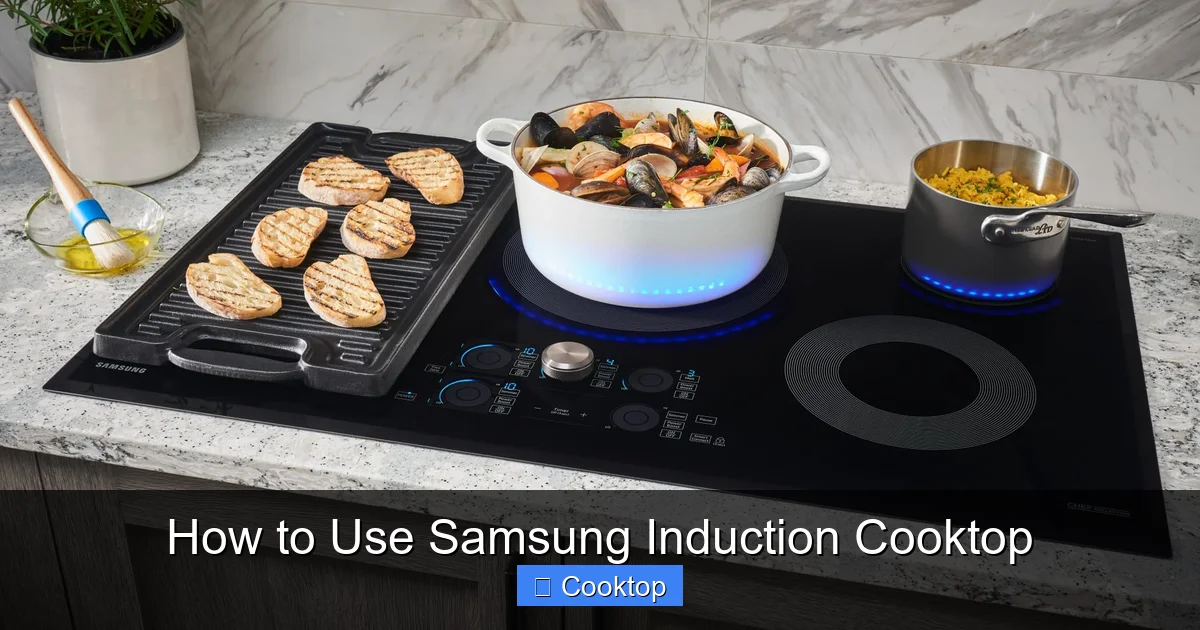
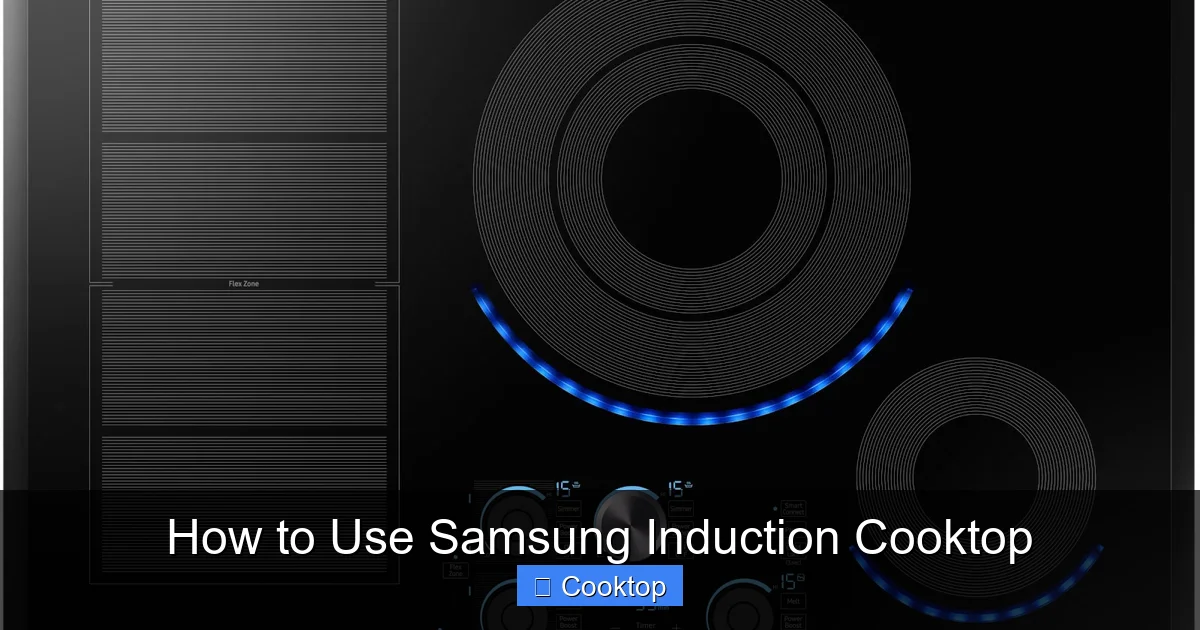
For the best results, make sure your pan is centered on the cooking zone. Samsung cooktops often have different sized zones. Using a small pan on a huge burner might result in uneven heating or the burner not activating at all. Always match the size of your pot to the size of the circle on the glass for maximum efficiency.
How to Operate the Controls
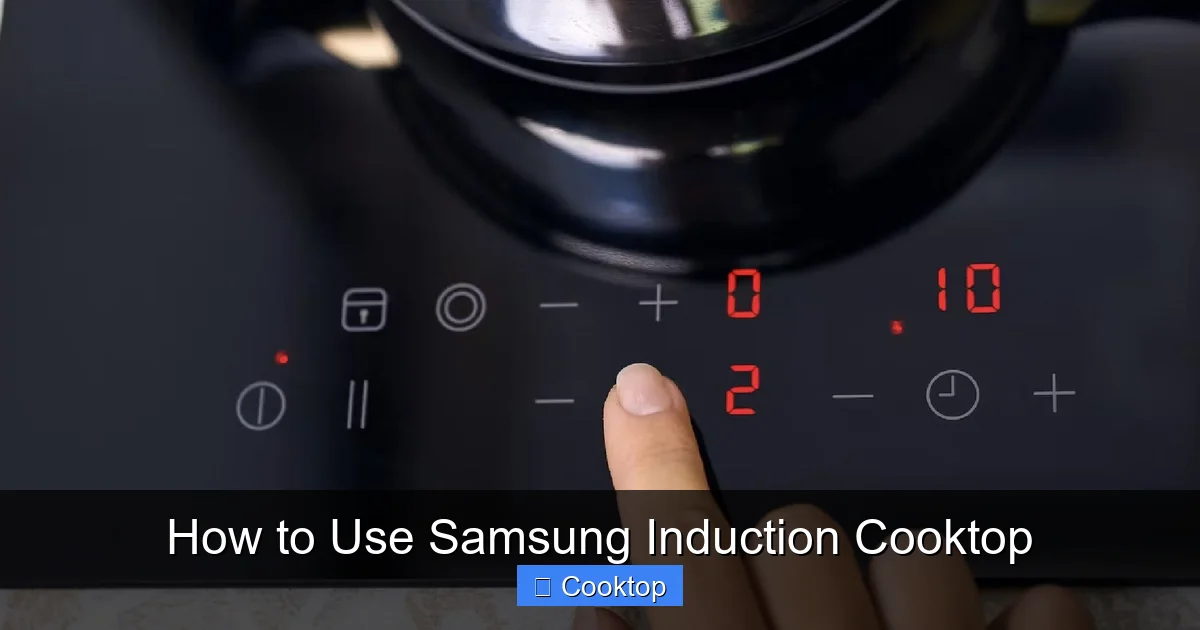
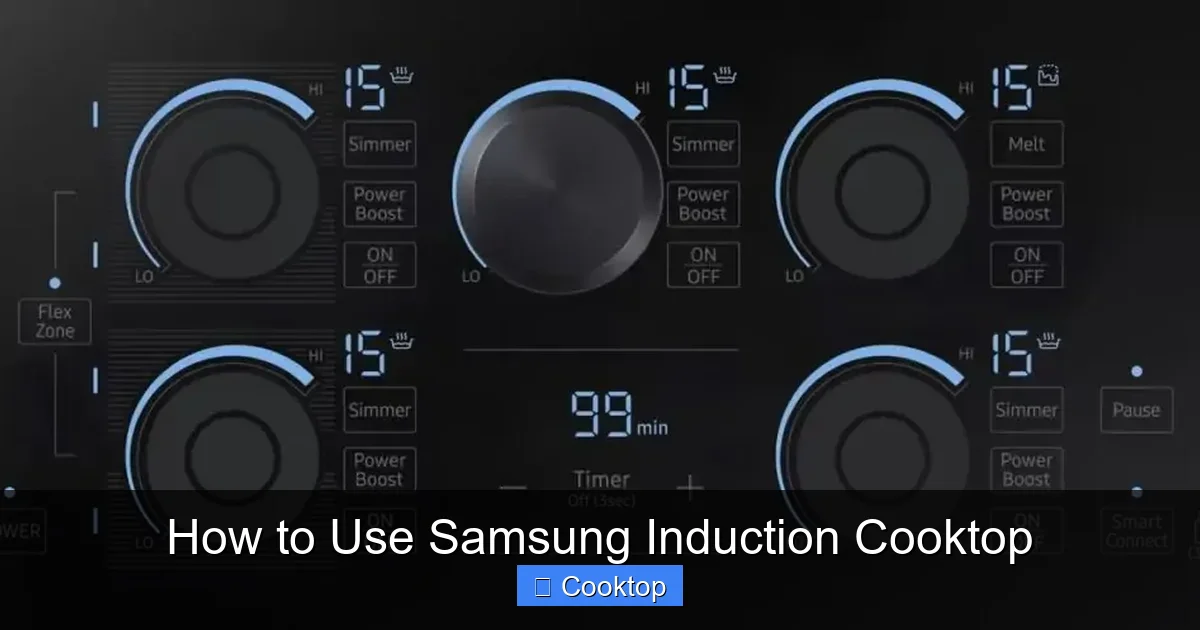
Samsung is known for sleek, modern designs. Most of their induction cooktops use a touch-control panel. There are no knobs to turn, which makes the surface much easier to clean. However, touch controls can feel different if you are used to physical dials.
Visual guide about How to Use Samsung Induction Cooktop
Image source: assets.ajmadison.com
Powering On and Off
To start, press and hold the Power button. You will usually hear a beep and see the display light up. To turn the unit off, simply press the power button again. If you need to shut everything down quickly, most models have a lock feature or a main power switch to ensure safety, especially if you have children or pets in the house.
Adjusting the Heat Levels
Most Samsung models use a sliding scale or a plus/minus button system. Usually, the levels range from 1 to 9.
- Levels 1-3: Perfect for simmering, melting chocolate, or keeping food warm.
- Levels 4-6: Great for sautéing vegetables or medium-heat cooking.
- Levels 7-9: Ideal for searing meat or frying.
If you want to change the temperature, just slide your finger across the control bar or tap the buttons until you reach your desired level. The response is instant, so you don’t have to wait for the element to “warm up” or “cool down” like you do with electric stoves.
Using the Power Boost Feature
One of the best parts of learning how to use Samsung induction cooktop technology is the Power Boost mode. This feature sends a massive amount of energy to the burner for a short period. It is incredibly useful for boiling a large pot of water for pasta or searing a steak quickly. Just tap the “Boost” button, and you will see water boiling in a fraction of the time it takes on a gas stove.
Advanced Features and Tips
Once you are comfortable with the basics, you can start exploring the extra features that make Samsung cooktops so powerful. These tools help you get consistent results every time.
Visual guide about How to Use Samsung Induction Cooktop
Image source: therationalkitchen.com
The Timer Function
Many Samsung models come with built-in timers for individual burners. This is a lifesaver when you are simmering a sauce and don’t want it to boil over. You can set a timer, and the cooktop will alert you when the time is up. Some models will even turn the burner off automatically once the timer hits zero, adding an extra layer of safety to your kitchen.
The Child Lock and Safety Features
Safety is a huge advantage of induction. Because the surface doesn’t get red-hot, the risk of burns is lower. However, the controls can still be accidentally pressed. Look for the Child Lock button (usually indicated by a lock icon). Hold this button for a few seconds to lock the controls. This prevents kids or pets from accidentally turning on a burner.
Managing Multiple Zones
If you are cooking a big meal, you might have four or five things going at once. Samsung’s power management system ensures that the cooktop doesn’t overload your home’s electrical circuit. If you have all burners on “Boost” at once, the system might slightly lower the power to distribute it evenly. This is normal and ensures your home’s breakers don’t trip.
Cooking Strategies for Induction
Cooking on induction is slightly different than cooking on gas. Because the heat is so immediate, you have to change your approach a little bit to avoid burning your food.
Visual guide about How to Use Samsung Induction Cooktop
Image source: image-us.samsung.com
Avoid Preheating Too Long
On a gas stove, you might wait a few minutes for the pan to get hot. On a Samsung induction cooktop, the pan heats up almost instantly. If you leave a pan on high heat for too long without food in it, you can actually damage the pan or the cooktop surface. Put your oil or butter in the pan before you turn on the heat, or turn it on and add your ingredients immediately.
Searing and Sautéing
Because the heat is so precise, you can sear meat perfectly. Start on a high setting to get that brown crust, then quickly slide the control down to a medium setting to finish cooking the inside. This instant adjustment prevents the meat from overcooking. If you are used to using other appliances, like learning how to use air fryer oven for beginners for roasting, you will find that the induction cooktop is the perfect companion for searing your meat before finishing it in the oven.
Simmering Without Burning
Induction is famous for its ability to maintain a very low temperature. This makes it perfect for delicate tasks like melting butter or simmering a delicate sauce. Use the lowest settings (1 or 2), and you will find that the food doesn’t “catch” or burn at the bottom as easily as it does on traditional electric stoves.
Cleaning and Maintenance
One of the biggest selling points of these cooktops is the flat glass surface. There are no grates to scrub or drip pans to soak. However, the glass can scratch if you aren’t careful.
Daily Cleaning
For daily cleanup, a damp microfiber cloth and a mild dish soap are all you need. Since the glass doesn’t get as hot as a traditional stove, food rarely “bakes” onto the surface. Just wipe it down after every use. Avoid using abrasive sponges or steel wool, as these can leave permanent scratches on the glass.
Dealing with Burnt-on Food
If something does spill and burn onto the glass, don’t panic. Use a specialized glass cooktop scraper. Hold the blade at a 45-degree angle and gently scrape the residue away. Once the debris is gone, wipe the area with a glass cleaner or a vinegar solution to restore the shine.
Avoiding Damage
To keep your cooktop looking new, avoid sliding your pans across the surface. Instead, lift the pan to move it. Sliding heavy cast iron pots can create tiny scratches over time. Also, make sure the bottom of your pans are clean. If there is grit or burnt food on the bottom of the pot, it can act like sandpaper against the glass.
Comparing Induction to Other Kitchen Tools
Many people integrate their induction cooktop with other modern appliances to create a high-efficiency kitchen. For example, you might use your cooktop to sear a piece of fish and then use an oven for the rest of the meal. If you have a Samsung oven with air fry features, you might wonder how to use air fryer setting on oven to get that crispy texture without the oil. Combining the speed of induction with the versatility of an air fry oven makes meal prep incredibly fast.
Some users also compare the energy efficiency of these tools. While induction is very efficient, you might be curious about other energy-saving options. For instance, knowing how much energy does an air fryer use compared to an oven can help you decide which appliance to use for different tasks. Generally, induction is one of the most energy-efficient ways to heat food because very little heat escapes into the room.
Common Troubleshooting Tips
Even with a high-end Samsung appliance, you might run into a few hiccups. Here are the most common issues and how to fix them.
The “No Pan” Error
As mentioned before, if the display is flashing or showing an error, it usually means the pan isn’t compatible. Double-check with your magnet. If the pan is magnetic but still isn’t working, make sure the pan is large enough for the burner. If the pan is too small, the sensors won’t detect it.
The Cooktop is Making a Humming Noise
You might hear a slight humming or buzzing sound when using high power or “Boost” mode. This is completely normal. It is the sound of the magnetic coils vibrating. It doesn’t mean anything is wrong; it’s just the physics of induction at work.
The Controls Aren’t Responding
If the touch controls aren’t working, check for two things. First, make sure the Child Lock isn’t on. Second, check if there is water or grease on the control panel. Touch sensors can sometimes get confused if there is a layer of liquid or food on the glass. Give the panel a quick wipe with a dry cloth, and they should work perfectly again.
Conclusion
Learning how to use Samsung induction cooktop features is a game-changer for any home cook. Once you move past the initial learning curve of choosing the right pans and getting used to the touch controls, you will wonder why you didn’t switch sooner. The combination of speed, safety, and easy cleanup makes it a superior choice for the modern kitchen.
Remember to always use magnetic cookware, be careful not to slide your pots, and take advantage of the Power Boost feature for those rushed weeknight dinners. By following these simple steps, you will keep your cooktop in great condition and enjoy a faster, more precise cooking experience. Happy cooking!
Frequently Asked Questions
Do I need to buy all new pots and pans for a Samsung induction cooktop?
Not necessarily. Use a magnet to check your current cookware; if the magnet sticks to the bottom, the pan will work. If it doesn’t, you will need to purchase induction-compatible cookware like cast iron or magnetic stainless steel.
Is induction cooking safer than gas or electric?
Yes, it is generally safer because the cooktop surface doesn’t get nearly as hot as traditional stoves. This significantly reduces the risk of accidental burns and eliminates the risk of gas leaks or open flames.
Can I use my glass or ceramic pots on an induction stove?
No, standard glass and ceramic pots will not work because they are not magnetic. However, some specialty ceramic pots come with a magnetic base specifically designed for induction cooktops.
Why does my Samsung induction cooktop make a buzzing sound?
A light humming or buzzing sound is normal for induction technology. This is caused by the magnetic field interacting with the metal of the pan, especially when using high heat settings or the Boost function.
How do I clean the glass surface without scratching it?
Use a soft microfiber cloth and a mild detergent or a dedicated glass cooktop cleaner. Avoid using steel wool, scouring pads, or harsh chemicals that could etch or scratch the glass surface.
Does the Boost mode burn food more easily?
Boost mode provides intense heat very quickly, which can lead to burning if you aren’t paying attention. It is best used for boiling water or quick searing, and you should transition to a lower setting once the desired temperature is reached.